Try a quick experiment. Open ChatGPT, Gemini or Perplexity and ask it to recommend a business like yours, in your area. Then ask directly about your website: what it offers, what it costs, when it’s open.
If the assistant answers with old, generic information or details taken from other websites, one possible cause is the simplest of all: your website won’t let it in.
A new way of searching
For twenty years, getting found meant one thing only: showing up on Google. Today a growing share of questions takes another route. People write what they’re looking for to an AI assistant, in their own words, and the assistant answers by putting together what it has read around the web, often citing its sources.
To read websites, these services use automated programs, crawlers, just as Google does. Each one has its own name: GPTBot and OAI-SearchBot for OpenAI, PerplexityBot for Perplexity, Google-Extended for Google’s models, and more.
Every website tells these programs what they can read through a small public file, robots.txt. If it says to stay out, a well-behaved crawler respects that. And your website, for that assistant, stops existing as a source.
The block you didn’t choose
Nothing strange so far: blocking AI crawlers is a legitimate choice. The problem is that very often it isn’t a choice at all.
The most common case involves Cloudflare, the service that protects and speeds up a huge number of websites. In its bot settings it can manage robots.txt automatically and block AI crawlers, and on newer sites this protection is often switched on by default. The site owner gets no warning: the website works, visits come in, everything looks fine.
The website is perfectly visible to Google and completely invisible to AI assistants. And nobody notices.
The same can happen with some security plugins, with a robots.txt copied from an old template or with a rule added years ago by whoever built the site and then forgotten.
How to check in two minutes
Read your robots.txt
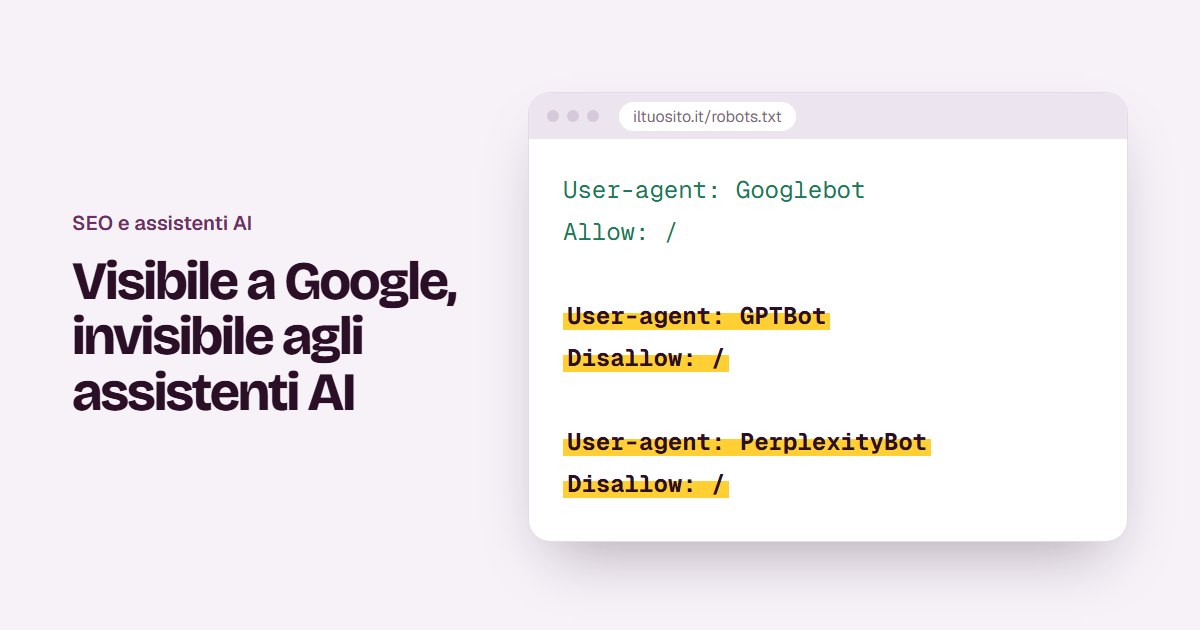
Open your browser and type your website address followed by /robots.txt, for example yoursite.com/robots.txt. Look for lines like these:
A typical block
User-agent: GPTBot
Disallow: /
The name after User-agent is the crawler, and Disallow: / means “don’t read anything”. If you find the names of AI crawlers followed by this line, those services aren’t reading your website.
If you use Cloudflare, check the bot settings
In the Cloudflare dashboard, in the bots section, check whether AI crawler blocking or automatic robots.txt management is switched on. That’s where it’s decided, and that’s where you change it.
Or let an audit check it for you
An audit that measures AI visibility reads your robots.txt for you, lists which crawlers are allowed and which are blocked, and flags the Cloudflare case.
Block or let them read?
There’s no answer that suits everyone. A news publisher that lives off its content may have very good reasons not to let it be read. But for most businesses the question is a different one: do I want people who ask an AI assistant for advice to find me too?
For a restaurant, a B&B, a professional firm or a shop the answer is almost always yes. The information you publish, opening hours, services, prices, where you are, exists precisely so that people can find it.
Some services distinguish between the crawler that collects text to train models and the one that looks up information to answer in real time. If you want a middle ground, you can let the second kind in and keep the first out. What matters is that the decision is yours.
What about the llms.txt file?
It’s a recent proposal: a text file in the root of your website, written in Markdown, that summarises for AI assistants who you are, what you offer and where to find your main pages. It isn’t an official standard and not every service uses it.
But it costs very little to prepare and has no downside: it’s a tidy way of telling assistants what really matters on your website.
Being read isn’t enough: you need to be quoted
Opening the door to crawlers is the first step. For an assistant to use your website as a source, the content also has to be easy to understand and repeat:
- Clear answers. Pages that answer a specific question, with a sentence that can be quoted as it is: “We’re open Tuesday to Sunday, from 12 to 2:30pm.”
- Structured data. Information described in a way a machine can understand: address, opening hours, prices, FAQs.
- Real FAQs. The questions you actually get, not the ones you’d like to get.
In short
Check your robots.txt today: it takes two minutes. If you find AI crawlers blocked and you didn’t decide that, unblock at least the ones that help answer people’s questions.
For years we worried about how Google sees us. Now it’s worth asking how we’re seen by the assistants our customers ask the same questions.